WordPress pluginBeta
PHPReady
Get your WordPress site ready for the next PHP version
Helps you find PHP 8.2 to 8.5 problems in your plugins and themes, and holds back updates with known problems on your server.
Checks for PHP 8.2 to 8.5
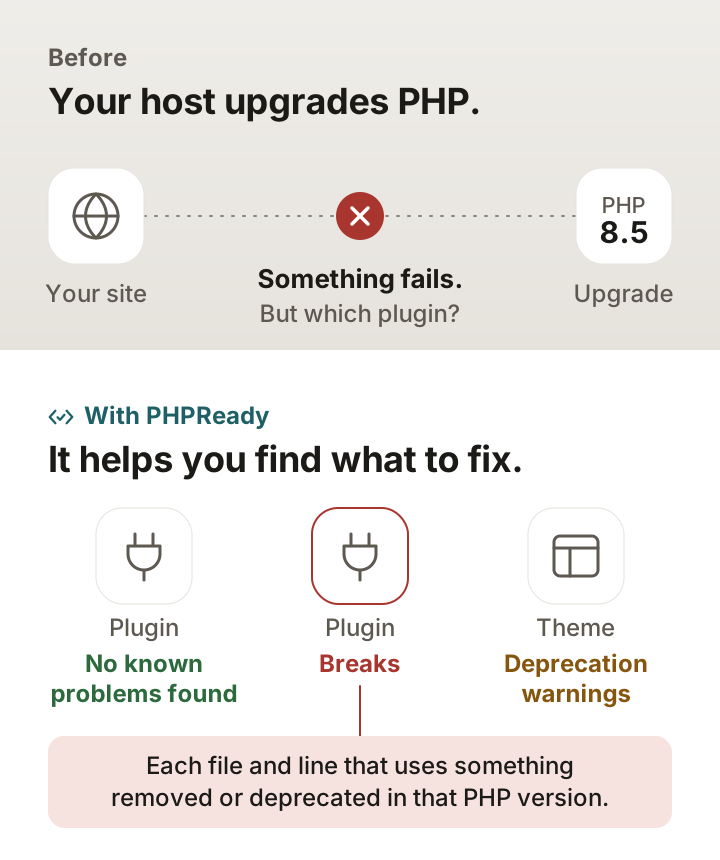
PHPReady reads the code of every installed plugin and theme and lists each file and line that uses something removed or deprecated in the PHP version you pick. It uses the current PHPCompatibility rules, not the 2019 release older checkers ship.
Runs on managed hosts
The scan runs inside WordPress in short steps. It needs no exec() and no shell access, so it works on hosts that switch those off.
Holds back updates with known problems
When an update is offered, PHPReady checks the new version against your server's PHP before it is installed. If the scan finds errors on your server's PHP version, it holds the auto-update and tells you why.
Pricing
-
Free
$0
- Scans of every plugin and theme for PHP 8.2 to 8.5
- Update guard for plugin and theme updates
- PHP end-of-life dates and host deadlines
-
Pro
$9/month per site
- Everything in Free
- Weekly rescan against the next PHP version, with email alerts
- Log of PHP deprecation notices by plugin
- Fixed-version check and a client report
-
Agency
$49/monthPlanned price
- Everything in Pro
- Up to 25 sites
- Email us to set it up
Done-for-you upgrade Want it fixed for you? A PHP upgrade done for you, from $35, tested on staging first (on Fiverr)
Questions
Does a clean scan mean my site will work on the new PHP version?
No tool can promise that. PHPReady reads code without running it, so it can miss problems in code that is built at runtime and can flag code that never runs. Treat a clean result as a good sign, and test on a staging copy before a big upgrade.
Why would an update be held?
When the new version of a plugin or theme uses code your server's PHP version cannot run, PHPReady holds its auto-update and shows the file and line. You can still update by hand, or once the vendor ships a fix.
Is my code sent anywhere?
No. The scan runs on your own server. To check an update before it is installed, PHPReady downloads it from the same address WordPress already uses for that update.
When will it be on WordPress.org?
It is waiting in the WordPress.org review queue. Until then, download the plugin here and upload it under Plugins > Add New Plugin > Upload Plugin.