Missing brand in Google Merchant Center: fixing WooCommerce products without a brand
· Updated
A missing brand issue means Merchant Center wants a brand for the product and your data does not give one. In a WooCommerce store this can hit products the owner makes or sources without a label, because the product feels brandless. Google does not see it that way, and its rule is simple once you read the attribute page.
What Google says about brand
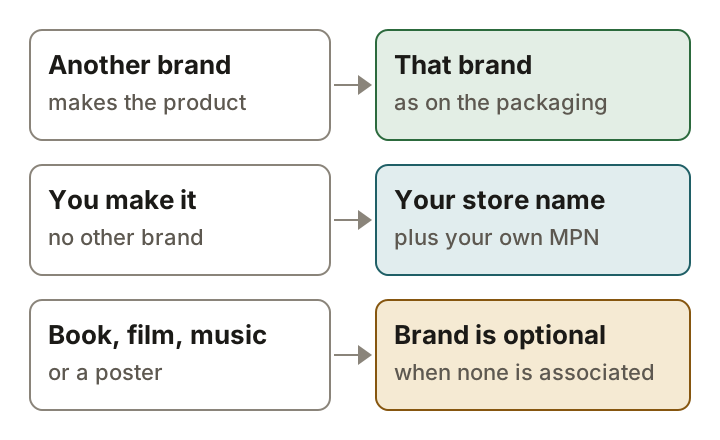
Google's brand page says the attribute is required for each product with a clearly associated brand or manufacturer. It is also required for each product where the manufacturer is also the merchant, and the page gives homemade and custom-made products as examples. That is the case that surprises people: if you make it, you are the manufacturer, and a brand is required.
It is optional for a product that has no clearly associated brand. The page names movies, books, music and posters. For media such as CDs it suggests the publisher name as the brand. The value is a string of 1 to 70 characters, and Google recommends ASCII only.
Your own products: store name or domain
For a product you make and sell under no other name, Google says to use your store name as the brand, and to submit an MPN with a unique identifier of your own choosing instead of setting identifier_exists to false. WooCommerce's FAQ for Google for WooCommerce gives slightly different wording: enter your domain name without https and www as the brand, the product SKU as the MPN, and leave the GTIN blank when none exists. The two ways of naming yourself are close. Pick one form and use it on every product you make, so the same seller is not listed as two brands.
Do not make a brand up. Google's page says to provide a brand only when you are sure it is correct and not to guess. Do not send the brand twice in two languages or alphabets, and do not add a brand to the product image to satisfy the field.
Special cases
| Product | What Google says |
|---|---|
| Compatible or replica product | Send the brand of the company that built it, not the original manufacturer's brand. |
| Bundle or multipack you created | Send the brand of the main product or of the multipack, not the brands of each item in it. |
| Apparel & Accessories category | A valid brand is required. |
| Shoes, sunglasses, handbags, watches | Also add a GTIN or an MPN. A GTIN must be the one the manufacturer assigned. |
Where to set it in WooCommerce
Google for WooCommerce adds a tab called Google for WooCommerce to the Product data box. It holds a field labelled Brand and one labelled Manufacturer Part Number (MPN). If the WooCommerce Brands extension is active, the Brand field also offers a value called From WooCommerce Brands, which uses the product's brand term. WooCommerce's FAQ also describes an attribute mapping feature for filling identifier fields across many products at once, which is the better route when hundreds of products are affected.
Diagnose and confirm
In Merchant Center, open Products and the Needs attention tab, then filter for the affected products. Google's fix page for missing brand is written for products in Apparel & Accessories, so for other categories read the issue text on the product itself, then open the product in WordPress and look at the Brand field on the Google for WooCommerce tab. A blank field would explain the issue.
After you save, Google says the change may take some time to leave the Needs attention page, and gives no figure. WooCommerce's FAQ says it can take around 3 days for Google to review product data. Check the page again after that, not an hour later.
What not to do
- Do not invent a brand to clear the flag. Google says to leave it out when you are not sure it is correct.
- Do not set identifier_exists to false. WooCommerce's FAQ says that logic is deprecated and can cause errors and disapprovals.
- Do not use the original manufacturer's brand on a compatible product.
- Do not fill a GTIN you do not have. A brand and an MPN are what Google asks for on products that have no GTIN.
Sources
- Google Merchant Center Help: Brand (brand)
- Google Merchant Center Help: How to fix Missing brand
- WooCommerce docs: Google for WooCommerce FAQ
- Google for WooCommerce source: the Google for WooCommerce product tab
- Google for WooCommerce source: the Brand input
- Google for WooCommerce source: the WooCommerce Brands integration
Add a brand to a WooCommerce product for Google
- Open the product. In WordPress, go to Products and open the product Google flagged.
- Open its Google for WooCommerce settings. In the Product data box, open the tab called Google for WooCommerce, where the Brand and Manufacturer Part Number (MPN) fields are.
- Enter the brand. Type the manufacturer's brand. For your own products Google says to use your store name; WooCommerce's FAQ says your domain name without https and www. Do not guess.
- Add the MPN for your own products. For products without a GTIN, give an MPN (WooCommerce's FAQ suggests your SKU) and leave the GTIN blank.
- Update and wait for the sync. Click Update. WooCommerce's FAQ says a created or updated product syncs through an async job, and that Google can take around 3 days to review product data.
Questions
I make the products myself. Do I still need a brand?
Yes. Google's brand page says the attribute is required where the manufacturer is also the merchant, for example homemade and custom-made products. It says to use your store name; WooCommerce's FAQ says your domain name without https and www.
Do books need a brand?
Not when no brand is clearly associated with them. Google names movies, books, music and posters as optional. For CDs it suggests the publisher name as the brand.
How long can a brand be?
Google's brand page gives a limit of 1 to 70 characters and recommends ASCII only.