Missing product description in Google Merchant Center (WooCommerce)
· Updated
A missing description issue means the description Merchant Center holds for a product is empty. In a WooCommerce store the text can look fine on the product page and still arrive empty at Google, because the extension does not send everything the page shows. Knowing what it sends is the whole fix.
What Google says
Google's description page gives a range of 1 to 5,000 characters. It says each product should have a description, and that a product without one gets a warning and may have limited performance. It also says to list the most important details in the first 160 to 500 characters. If the text is longer than the limit, Google truncates it and issues a warning. The page sets no minimum length beyond one character, so there is no number of words that counts as too short. What it asks for is text that describes the product.
On content, Google asks for features, technical specifications and visual attributes. It lists size, material, intended age range, special features, shape, pattern, texture, design and variants such as colour. For a bundle or multipack, describe everything in it. For a customised product, describe the customisation, for example an engraving.
What Google for WooCommerce sends
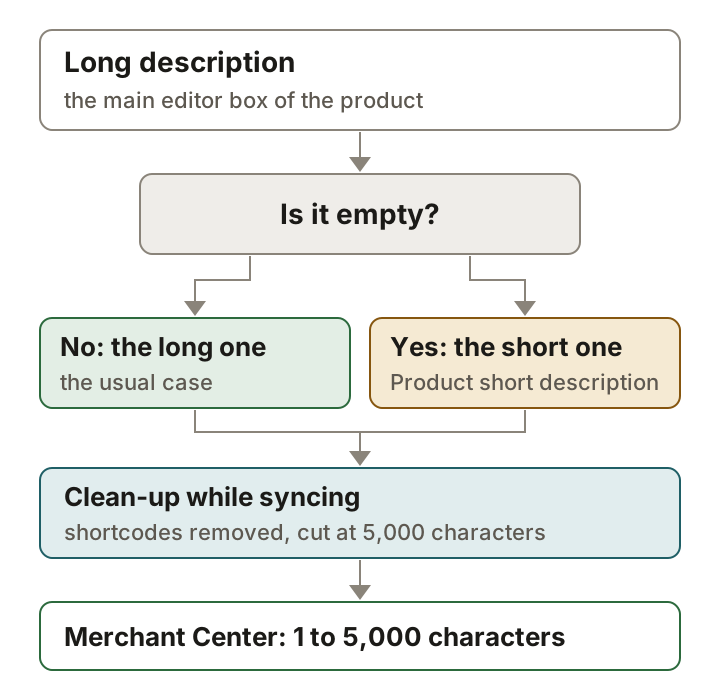
WooCommerce's FAQ says the description defaults to the standard (long) description, and that the short description is used when no standard description is specified. The extension's code shows the details: it sends the long description unless it is empty, then the Product short description. It removes shortcodes, removes tags that are not valid for a description and all tag attributes, and cuts the result at 5,000 characters. This is what the sync does, so it is what you should check.
| Text | What happens |
|---|---|
| Long description, not empty | Sent. |
| Product short description | Sent only when the long description is empty. |
| A shortcode in either | Removed. A description made only of shortcodes ends up empty. |
| HTML tags | Tags that are not valid are removed, and all attributes are removed. |
| More than 5,000 characters | Cut at 5,000 characters. |
| A variation | The parent product's description comes first, then the variation's own. |
Why the description is empty
There are two causes you can check in a minute. The first is that both boxes really are empty, for example on a product that an import created with a title only. The second is less obvious. If the product page is built with a page builder or a tab plugin, the visible text may be produced by a shortcode, and the extension strips shortcodes before it sends anything. The page shows a paragraph, the synced description is blank, and Merchant Center is right to flag it.
Diagnose it
In Merchant Center, open Products and the Needs attention tab, and filter for the product. Then open the same product in WordPress. Click into the main editor box and switch to the text view if your editor has one, and look for square brackets such as [something]. If the description is nothing but brackets, that is your answer. Then open the Product short description box lower on the page and see whether it has text.
Fix it
Write real text in the main editor box: what the product is, its material, size and colour, and what is included. Keep to what Google's page allows. Leave out comparisons with other products, links to your store or other sites, all-caps emphasis, gimmicky symbols and promotional text. Do not put prices, sale dates, shipping, delivery dates or your company name in it. Keep the text consistent with the product page, because Google asks for the data to match the landing page.
Developers have another route. The extension has a filter that applies shortcodes instead of stripping them. Use it only if you have checked what those shortcodes print, because their output must follow the same rules as any other description text.
add_filter( 'woocommerce_gla_product_description_apply_shortcodes', '__return_true' );Confirm it worked
Click Update on the product. WooCommerce's FAQ says a created or updated product syncs through an async job, and that Google can take around 3 days to review product data. After that, check the Needs attention tab again. If the product is still listed, open it in Merchant Center and read the description it holds. An empty value there means the sync has not arrived or the text was removed on the way, which sends you back to the shortcode check.
What not to do
- Do not compare the product with other products. Google asks you to leave comparisons out.
- Do not fill the box with keywords or all-caps text. Google asks you to avoid all caps and gimmicky symbols.
- Do not add your price, a sale announcement or shipping offers to the text.
- Do not leave the long description empty and rely on the short one without checking it. It is used only when the long one is empty.
Sources
- Google Merchant Center Help: Description (description)
- WooCommerce docs: Google for WooCommerce FAQ
- Google for WooCommerce source: how the product description is built
- Google for WooCommerce changelog (version 1.1.0 adds the short-description fallback; 1.4.0 adds the filter that applies shortcodes)
- WooCommerce source: the Product short description box
Add a product description that Google accepts
- Open the product. In WordPress, go to Products and open the product Google flagged.
- Check for shortcodes. In the main editor box, look for text in square brackets. The extension removes shortcodes, so a description made only of them is sent empty.
- Write the main description. In the main editor box under the product name, describe the product: what it is, material, size, colour and what is included. This is the text Google for WooCommerce sends, and it sends the Product short description only when this box is empty.
- Keep it within Google's rules. Stay under 5,000 characters and put the key details in the first 160 to 500. Leave out sale announcements, shipping offers, links and comparisons with other products.
- Update and wait for the sync. Click Update. WooCommerce's FAQ says a created or updated product syncs through an async job, and that Google can take around 3 days to review product data.
Questions
I only filled in the short description. Is that enough?
It is sent only when the long description is empty, per WooCommerce's FAQ. Writing a real long description is the safer fix, because the short one is dropped as soon as the long one has text.
How long can the description be?
Google accepts 1 to 5,000 characters and truncates anything longer with a warning. The extension also cuts the text at 5,000 characters.
Is there a minimum length?
Google's description page gives none beyond one character. It asks for the most important details in the first 160 to 500 characters.